
Collect - Settlement Finder
Ferrix LabsFinance
4.7702.00 Reviews
- Version
- 3.5.1
- Installs
- 100.00K
- Age Rating
- Everyone
Screenshots

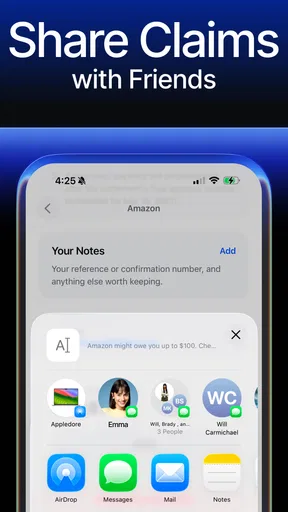
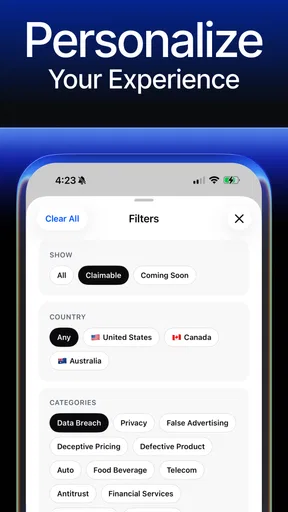
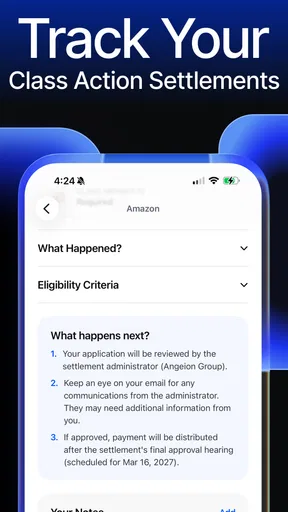
Our Review of Collect - Settlement Finder
 Analysis by Appyee
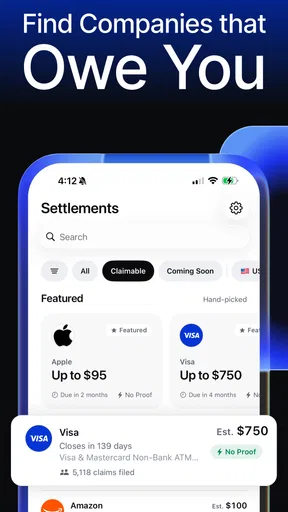
If you have ever heard about a class action settlement after the deadline passed, Collect - Settlement Finder is aimed at that exact frustration. I approached it as a first-time user would: install it, understand what it is asking me to do, find a relevant settlement, and work out whether filing is worth the effort. The app belongs to the finance category and comes from Ferrix Labs. Its central purpose is simple: help people look for settlement money they may be eligible to claim and guide them through the filing process.
That sounds useful, but it is important to set the right expectation from the beginning. This is not a general budgeting tool, a banking app, or a guaranteed payment service. It is better understood as a claims-discovery and filing companion. The practical value depends on whether a settlement matches your circumstances, whether the claim period is still open, and whether you can provide the information the form requests. I found that distinction reassuring rather than disappointing, because it keeps the app’s role clear.
The app is free to install, although its listing includes in-app purchases ranging from around thirteen dollars to around thirty-five dollars per item. That makes it especially important to read each screen carefully before confirming anything. A person who only wants to browse possible claims may have a different tolerance for paid options than someone who has already found a settlement that appears valuable. I would not treat every suggested claim as automatically worth paying to pursue.
Getting from installation to a useful claim search
I’d begin by treating the first search as a quick check against your own history, not as a hunt for every possible payout. Keep a few likely companies or services in mind, then compare any promising result with old receipts, account emails, or statements before starting a form. That small preparation makes the next step—judging whether a claim is genuinely worth pursuing—much clearer.
What the first launch is really about
On first opening Collect, I would focus less on trying to understand every possible settlement and more on identifying the app’s basic workflow. The useful path is usually: look for a settlement, open its details, compare the eligibility requirements with your own situation, and then decide whether to continue. That order matters. Starting with a form before checking eligibility can turn a quick search into an unnecessary paperwork session.
The app’s short store label is simply “Collect,” while its longer description explains the settlement-filing purpose. That difference is small, but it affects how I would recognize it on a phone after installation. I would also check that the developer shown on the store is Ferrix Labs before proceeding, particularly if several similarly named finance apps appear in search results.
Collect has a 4.7 average from around nine thousand ratings, with roughly three hundred written reviews, and it has passed the one-hundred-thousand-install mark. Those figures suggest that the concept has attracted meaningful interest, but they should not replace careful reading of an individual claim. A high overall rating tells me that many people find the app useful; it does not prove that every settlement is relevant to me or that every filing will produce money.
A calm setup is better than rushing
For a first-time user, the best setup habit is to keep a small amount of personal history nearby. Think about purchases, subscriptions, services, or accounts that might connect to a settlement notice you have seen. You do not need to guess at eligibility from memory if you can check old email, receipts, account records, or bank statements while reviewing a claim.
This is one of the less obvious trade-offs of a settlement finder. The app can make discovery easier, but it cannot create evidence of a purchase or experience that never happened. If a claim asks for dates, account details, or other supporting information, accuracy is more valuable than speed. Entering an approximate answer simply to finish the form may weaken the claim or create confusion later.
I would also keep a record of the settlement name, the filing date, and any confirmation information shown after submission. Even if the app makes the process feel organized, a separate note gives you a dependable reference if you later need to check what you filed. This is particularly useful when several claims have similar names or involve the same company.
The first meaningful success
The first real success is not installing the app or opening a long list. It is finding one settlement that clearly fits your own history and reaching a point where you understand the next action. For example, imagine receiving a notice about a service you used several years ago. Instead of searching the web for scattered legal pages, you could use Collect to locate the relevant claim, read the eligibility language, and compare it with your account records.
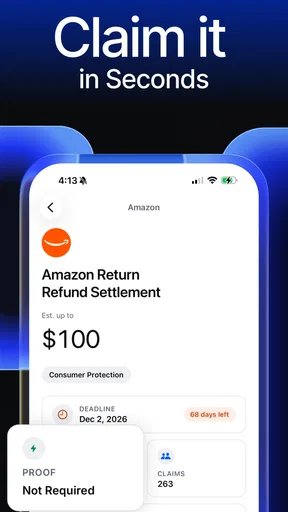
At that point, I would pause before tapping through the final steps. Check whether the claim is still accepting submissions, what information is required, and whether the possible benefit justifies the time involved. Settlement outcomes can vary, and a claim that sounds attractive in a headline may produce a modest payment after the process is complete. The app is most helpful when it reduces searching and organizes the decision, not when it encourages blind submission.
A useful personal workflow is to separate claims into three groups: clearly relevant, possibly relevant, and not relevant. File the first group when the details are comfortable and the deadline allows it. Investigate the second group only after finding the missing information. Ignore the third group rather than filling out forms “just in case.” That simple sorting method prevents the app from becoming a source of clutter.
Where new users may become confused
The biggest possible misunderstanding is assuming that appearing in a settlement search means you are entitled to money. It does not. A listing is an invitation to examine the conditions, not a promise of eligibility. I would read every requirement instead of relying on the settlement title, especially when the name sounds familiar but the relevant dates, products, locations, or account types may be narrower than expected.
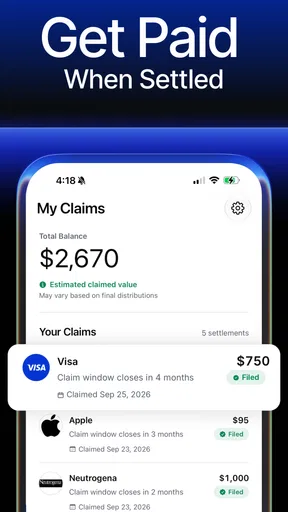
Another point that deserves attention is the difference between submitting a claim and receiving a payment. Filing is only one stage. A claim may need review, and the final amount may depend on the number of valid submissions or the settlement’s distribution formula. Collect can help with the discovery and filing side, but I would not use it as a substitute for understanding the legal notice or official settlement instructions.
Payment prompts are another area where a careful pause helps. Because the app offers in-app purchases in the approximate thirteen-to-thirty-five-dollar range, I would not assume that every useful action requires payment, nor would I confirm a purchase without reading what it covers. Compare the potential value of the claim with the cost shown on screen. If the likely benefit is uncertain or small, a free official route may be the more sensible choice.
That comparison is important because settlement claims can often be pursued through the official administrator’s website or notice instructions. Those alternatives may take more searching and may feel less convenient, but they can be preferable when you want to avoid an added app charge or verify the source independently. My view is that Collect earns its place when its organization saves meaningful time, not merely because it puts a familiar legal process behind a simpler interface.
How I would handle a real everyday scenario
Suppose I remember paying for a service that later appeared in a consumer settlement announcement, but I no longer remember the exact account dates. I would begin by searching inside Collect, then open the settlement details and write down the requirements before entering anything. Next, I would search old email and account statements for the relevant period. If the records matched, I would continue; if they did not, I would leave the claim alone rather than stretching the facts.
If the form asked for information I could not verify, I would treat that as a stop sign, not a challenge to guess. I would also inspect any final review screen for spelling, dates, contact details, and payment information before submitting. This is a small but valuable practice: a claims app may make the process quick, but quick data entry can still produce avoidable mistakes.
After submission, I would save the confirmation details outside the app and avoid submitting the same claim through multiple channels unless the settlement instructions specifically explain how duplicates are handled. Duplicate filings can create more confusion than benefit. The strongest use of Collect is a deliberate, documented workflow rather than a rapid sweep through every result.
Who will get the most from it
I think Collect is a good fit for people who regularly miss settlement notices, dislike searching through legal pages, or want a more approachable starting point for claims they may already qualify for. It can also help someone organize a small number of possible claims after moving, changing services, or losing track of old purchase records.
It is less suitable for someone who expects guaranteed compensation, wants a complete personal-finance dashboard, or is unwilling to review eligibility conditions. It is also not the right tool for replacing legal advice in a complicated dispute. If your situation involves an individual lawsuit, a serious financial loss, or uncertainty about your rights beyond a standard consumer claim, a qualified professional or the official settlement administrator may be a better source of guidance.
People who are very cost-sensitive should pay special attention to the purchase screens. A free installation is attractive, but the presence of paid items changes the decision. I would compare the app’s convenience with the official route before paying, particularly for a claim where the possible distribution is unclear. That does not make the app poor; it simply means convenience has a price in some parts of the experience.
Practical habits that make the app more useful
My first tip is to search with a purpose instead of opening every result. Start with companies, products, or services you genuinely used. This reduces the chance of confusing a familiar brand name with a settlement whose eligibility rules do not apply to you.
My second tip is to create a simple claim folder on your phone or computer. Keep the settlement name, relevant records, submission confirmation, and any follow-up message together. This turns Collect from a one-time search tool into part of a manageable record-keeping routine.
My third tip is to compare the app’s instructions with the official notice when a claim matters to you. The app may make the process easier to follow, while the official material remains the best place to examine exact conditions and deadlines. Using both sources is slower than relying on one, but it is a sensible trade-off for a claim involving valuable information.
A fourth useful habit is to review your own privacy comfort before entering sensitive details. I would avoid submitting information simply because a form requests it; first decide whether the request makes sense for the claim and whether I am comfortable with the route being used. When a question seems unrelated or unusually intrusive, I would stop and verify the settlement through its official channel.
What the current release tells me
The current version is 2.7.4, and the app is marked for users aged Everyone. It supports operating systems from version 9 onward, which makes it accessible to many older phones as well as newer devices. Those details are useful during installation, especially if you are setting it up on a family member’s phone or an older spare device.
The Everyone age label should not be confused with a guarantee that every settlement topic will be simple for every reader. Financial and legal language can still be difficult, so I would encourage younger users to involve a trusted adult when a claim asks for information they do not understand. The app may be approachable, but the underlying subject can require careful judgment.
My overall experience and recommendation
What I like most about Collect is the narrowness of its purpose. It does not try to be a complete money-management suite. Instead, it focuses attention on a task many people overlook: finding and filing claims connected to class action settlements. For a user who has missed notices in the past, that focus can make the process feel far more manageable.
The main friction is that the app cannot remove the uncertainty built into settlements themselves. Eligibility still depends on the details, payments are not automatic, and some users may question whether a paid option is worthwhile. The app also rewards patience more than impulse. Its usefulness drops sharply if someone treats every search result as a guaranteed payout or skips the official conditions.
My recommendation is therefore conditional but positive. Install Collect if you want a convenient starting point for discovering claims and you are prepared to verify your own eligibility. Use it as an organizer and filing aid, not as a promise of money. Before confirming any purchase, compare the cost with the likely value and check whether the official settlement route offers a better fit.
For me, the clearest path is straightforward: search only for situations connected to your real history, gather supporting records, read the requirements, review the final form carefully, and save confirmation details afterward. That careful process is what turns a settlement-finder app into a genuinely useful finance tool. With that mindset, Collect - Settlement Finder can save time without encouraging unrealistic expectations, which is exactly the balance I would want from an app in this category.
Privacy and Permissions
See what permissions an app requests and how it handles your data.
- Other
- view network connections, full network access, run at startup, control vibration, prevent device from sleeping, Google Play license check, read Google service configuration
Verdict
Strengths of Collect - Settlement Finder
- Quickly identifies nearby settlements with a clear map-based interface.
- Useful filters make it easier to narrow down locations by type or distance.
- Location details help with planning visits and exploring unfamiliar areas.
- Lightweight design keeps browsing responsive on most modern devices.
- Can inspire new travel routes and discoveries away from popular destinations.
Limitations of Collect - Settlement Finder
- Coverage and accuracy may vary considerably between regions.
- Some locations may have incomplete descriptions or outdated information.
- Requires location access for the best discovery and navigation experience.
- Map browsing can use noticeable mobile data during extended exploration.
- Limited value for users who are not interested in geographic exploration.
Similar Picks in This Category
View All
Google Wallet
Google LLC4.3

Airtel: Recharge, Bank & Loans
Airtel4.0

PayPal - Pay, Send, Save
PayPal Mobile4.2

DANA Indonesia Digital Wallet
PT Espay Debit Indonesia Koe4.5

Binance: Buy Bitcoin & Crypto
Binance Inc.4.8

Cash App
Block, Inc.4.7
Frequently Asked Questions
What is Collect - Settlement Finder, and how does it work?
Collect - Settlement Finder is designed to help users discover potential class-action settlements and check whether they may qualify to submit a claim. After opening the app, you can browse available cases, review eligibility details, deadlines, and required documentation, then follow the provided instructions. The app is primarily an information and claim-discovery tool, not a law firm or a guarantee that you will receive compensation.
Is Collect - Settlement Finder legitimate and safe to use?
Before using Collect - Settlement Finder, it is sensible to review its privacy policy, terms of service, developer information, and user feedback in the official app store. The app may request personal information when you investigate or submit settlement claims, so avoid entering unnecessary details and use only official links. Remember that legitimate settlements should not require you to pay an upfront fee simply to check eligibility or file a standard claim.
Can I really receive money through Collect - Settlement Finder?
The app may help you find settlements for which you could potentially qualify, but payment is never guaranteed. Eligibility depends on the official settlement rules, the information you provide, the validity of your claim, and whether the settlement fund is reduced because of the number of approved claims. Payments can also take months after the claim deadline, and some cases may offer vouchers, credits, or other compensation instead of cash.
What information or documents are needed to file a settlement claim?
Requirements vary from one settlement to another. Some claims may only ask for your name, email address, mailing address, and confirmation that you used a product or service during a specified period. Others may request receipts, account records, purchase dates, or supporting evidence. Read every case description carefully, provide truthful information, and keep copies of your submission and confirmation number in case you need to check its status later.
Are there any disadvantages or limitations I should know about before downloading it?
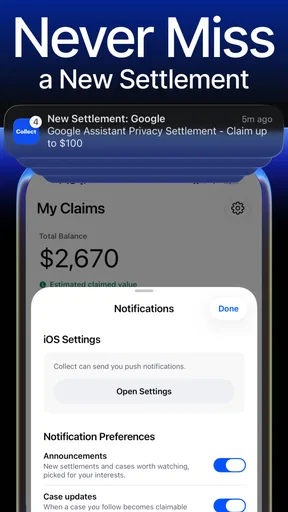
Collect - Settlement Finder can save time by bringing settlement information together, but it may not include every case, and listings or deadlines can change. You still need to verify important details on the official settlement website or court-approved notice. Availability may also depend on your country or state. Treat notifications carefully, protect your personal data, and do not assume that appearing in the app means you automatically qualify for compensation.
